 ScribeShot
How to use YouTube for homeschooling without passive screen time
YouTube can be an excellent homeschool supplement when a video is treated as a lesson source rather than the lesson itself. Give the video a purpose, capture only the ideas and visuals worth keeping, then make the learner retrieve or apply what they watched.
Start with a learning objective, not a search box
Before opening YouTube, write the thing the learner should be able to do afterwards. “Understand fractions” is broad. “Explain why 3/4 is larger than 2/3 using a visual model” is teachable and testable.
The objective changes how you search and what you keep. A five-minute visual explanation may be more valuable than a forty-minute lecture if it solves the exact learning problem.
Use YouTube as one layer of a homeschool lesson
- Question: state what the learner is trying to understand.
- Watch: use one focused video or a short section of a longer one.
- Capture: keep only the concepts, examples and visuals that support the objective.
- Retrieve: close the video and explain, draw or answer from memory.
- Apply: solve a problem, write a paragraph, conduct an experiment or make something.
- Review: revisit weak ideas later instead of replaying the entire lesson.
Watching is input, not proof of learning. A homeschool video becomes a lesson when the learner has to retrieve, explain, practise or apply something after watching.
Choose educational videos by teaching fit
Subscriber count is a poor proxy for whether a video fits today's lesson. Check whether the presenter explains assumptions, uses examples at the right level, distinguishes evidence from opinion, and gives the learner enough time or structure to follow the reasoning.
For younger learners, also consider pacing, reading level, visual density and whether the surrounding recommendations are appropriate for independent browsing. Parents should preview material when age fit or subject sensitivity matters.
Good channel types for homeschool families
| Need | Useful examples | Best follow-up |
|---|---|---|
| Structured multi-subject lessons | Khan Academy, CrashCourse | Answer questions or solve practice problems |
| Visual mathematics | 3Blue1Brown, Numberphile | Redraw the model or solve a related problem |
| Science explanations | Veritasium, SciShow, Kurzgesagt | Explain the mechanism and identify the evidence |
| Younger learners | SciShow Kids, Homeschool Pop | Tell back the main idea or make a simple project |
| Engineering and curiosity | Mark Rober, Smarter Every Day | Predict, build, test or explain a design choice |
| Short animated lessons | TED-Ed | Summarize, question and research one extension |
For a larger subject-by-subject list, see best educational YouTube channels for learning.
Take fewer notes than you think
A homeschool note does not need to reproduce the video. A strong default is one main idea, a few key concepts, the best example, important screenshots, questions, and a source timestamp for anything the learner may need to revisit.
The YouTube notes template gives you a reusable structure, while the screenshot guide helps decide when a diagram, equation, map or worked example should be preserved visually.
Use screenshots for information that is genuinely visual
Maps, labeled diagrams, geometry, timelines, experiments, equations and worked examples often lose information when converted into transcript text. Capture those moments and add one sentence saying what the learner should notice.
A screenshot should support understanding or later review. Decorative title cards and talking-head frames usually do not need to become part of the lesson record.
Finish with retrieval before review
When the video ends, close the notes and ask the learner to reconstruct the main idea. Younger learners can tell it back or draw it. Older learners can answer questions, solve a related problem or teach the concept in their own words.
Then reopen the notes, compare, and revisit only the weak section. The active recall guide and review guide show how to turn the saved lesson into later practice.
Keep a simple record by subject
For each useful video, save the URL, date, subject, learning objective, main idea, questions, any visual evidence, and the learner's follow-up work. That is enough to make a video part of a traceable homeschool learning record without creating paperwork for its own sake.
Where ScribeShot fits
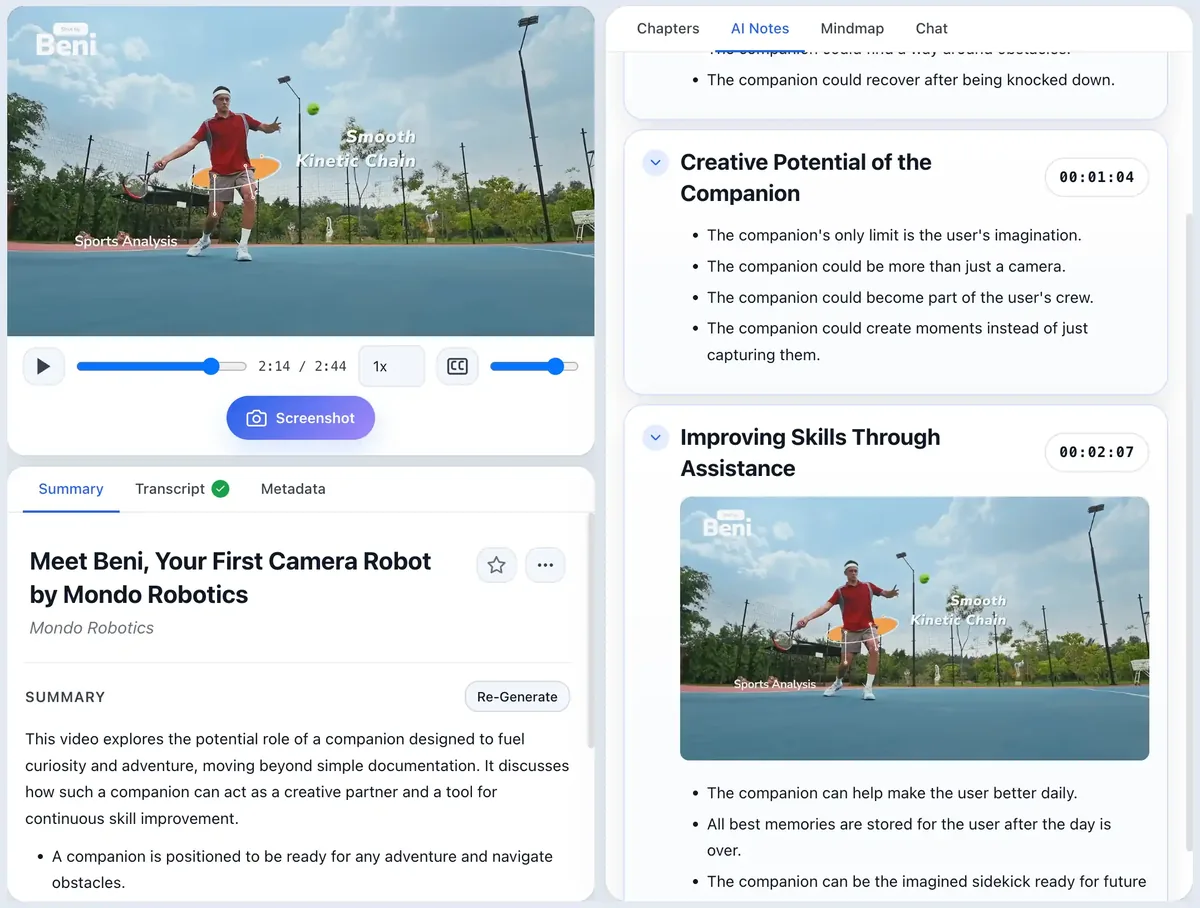
ScribeShot is a macOS tool for families who use YouTube as a serious learning source and want the useful parts to survive after the tab closes. It can generate transcript-based structure, keep timestamps, capture important frames, and save the result as local Markdown. The parent or learner still decides what matters and what should be practised.
Common questions
Can YouTube be used for homeschooling?
Yes. YouTube can supplement a homeschool curriculum with explanations, demonstrations, lectures, documentaries and worked examples. It works best when the parent or learner chooses videos for a clear objective and follows viewing with retrieval, discussion or application.
Can YouTube replace a homeschool curriculum?
A collection of videos is not automatically a curriculum. A curriculum also needs scope, sequence, practice, feedback and assessment. Use YouTube as a source of instruction or enrichment inside a broader learning plan.
How do I stop homeschool YouTube from becoming passive screen time?
Give each video a question to answer, pause only for important concepts or visuals, and require an output afterwards: explain the idea, answer recall questions, solve a problem, build something, or teach it back.
Should parents preview educational YouTube videos?
For younger learners especially, preview videos and playlists for age fit, accuracy, pacing, advertising or sponsorship context, and alignment with the learning goal.
Turn a useful video into a reusable lesson
ScribeShot keeps structured notes, timestamps and captured visuals together so a homeschool lesson can be reviewed without replaying the whole video.
Try 3 videos free • 3 screenshots per video • No credit card • Local AI option