 ScribeShot
YouTube Video Note Taker for Mac
Turn YouTube lectures, technical tutorials, and talks into structured Markdown notes that stay connected to the source: timestamped chapters, selected screenshots, mind maps, and video chat inside one macOS workspace.
Why video notes need more than a transcript summary
A transcript is useful for preserving what was said, but instructional video often carries important information on screen: code, equations, diagrams, slides, terminal output, and UI state. A durable video note should keep the written explanation together with the source moment and any visual evidence you will need later.
ScribeShot is designed around that source-linked workflow. The player, timestamped sections, captured frames, mind map, and chat stay in one workspace, while the resulting notes and images remain ordinary local files.
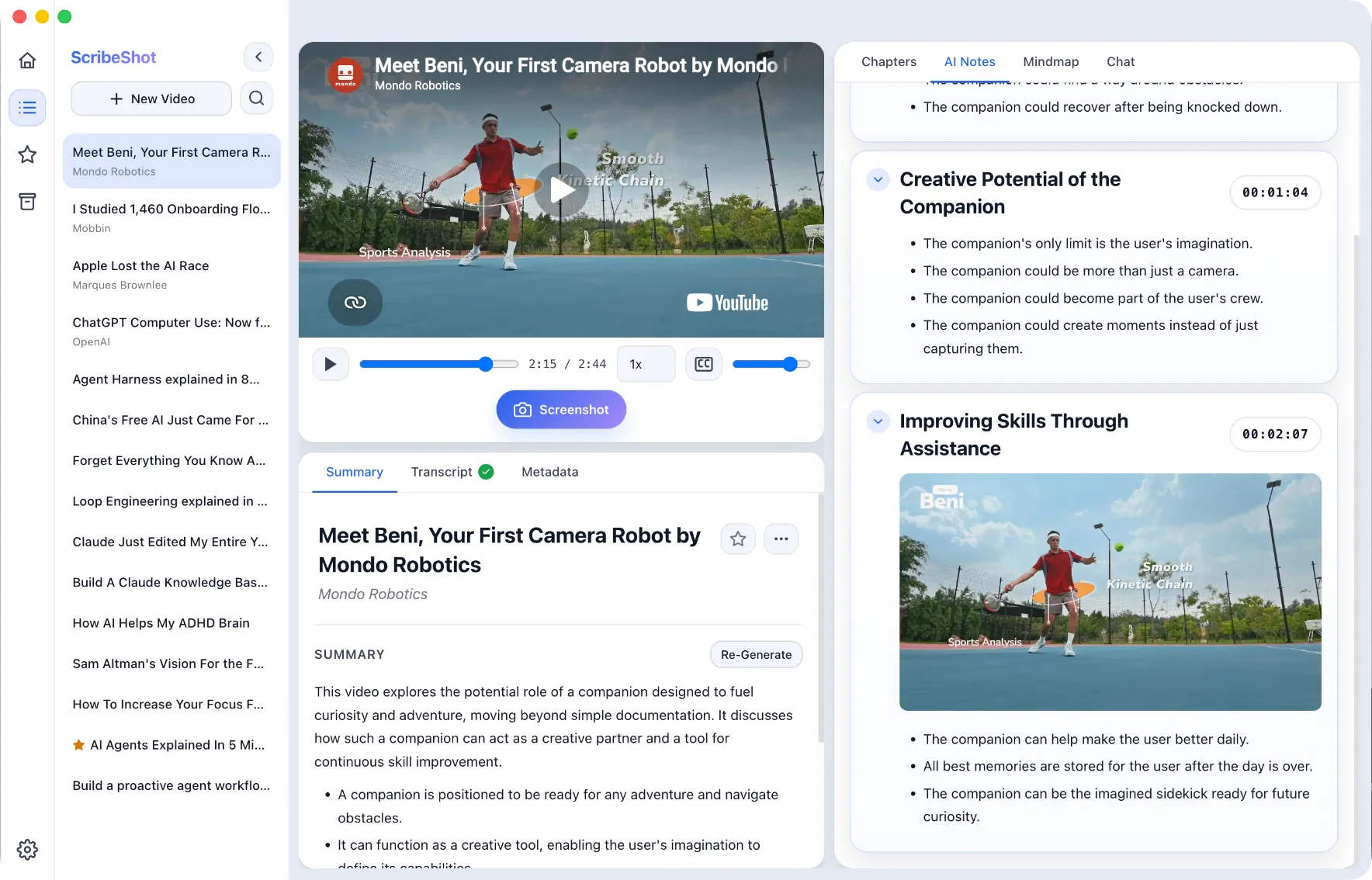
What the ScribeShot workflow keeps together
| Part of the workflow | What ScribeShot does | Why it matters later |
|---|---|---|
| Transcript & notes | Builds structured notes from the available YouTube transcript | You can scan the lesson without rereading raw speech |
| Source timestamps | Keeps chapters and note sections tied to real video times | A short note can point back to the full explanation |
| Selected video frames | Captures screenshots while you watch and files them beside the relevant section | Code, diagrams, equations, slides, and UI state are not reduced to speech alone |
| Mind map | Creates an expandable topic hierarchy linked to the timeline | You can inspect structure and jump to the source moment |
| Video chat | Uses transcript context and analyzed captured screenshots when relevant | Answers can remain tied to the source instead of becoming detached summaries |
| Local files | Writes Markdown and images to a folder you choose | The notes remain usable in Obsidian, editors, backups, and your own tooling |
Key features of ScribeShot YouTube Video Notes
- Structured notes and chapters: Generate a concise hierarchy from the available transcript with clickable source timestamps.
- Inline YouTube screenshots: Capture slides, whiteboard math, diagrams, code blocks, or UI states when the visual itself carries meaning.
- Interactive mind maps: Explore topic relationships and use nodes as navigation back into the video.
- Screenshot-aware video chat: Ask questions using the saved transcript and captured visual context, with relevant evidence linked back to the source.
- Plain Markdown storage: Keep notes and images in local folders that remain readable outside ScribeShot.
- Local AI option: Supported AI inference can run on your Mac after the model is downloaded; YouTube source access, model downloads, and updates still use the network.
Common questions
What makes ScribeShot different from other video note takers?
ScribeShot provides a native macOS workspace with synchronized player, inline screenshot capture, expandable mind maps, visual video chat, and offline Gemma 4 local LLM execution.
Where are notes stored?
In a local directory on your Mac in plain Markdown and standard image files.
Can I use it offline?
Supported AI inference can run locally after the model and source material are available. ScribeShot still needs internet access to open YouTube, fetch available transcripts and metadata, download models, and check for updates.
Start taking structured video notes
Three videos free with three screenshots each, no signup. Run the full workflow before deciding.
Try 3 videos free • 3 screenshots per video • No credit card • Zero AI cost with local LLM