 ScribeShot
YouTube Notes with Screenshots for Mac
A transcript preserves what was spoken, but it can miss what was only shown: whiteboard equations, presentation slides, code blocks, UI states, or architecture diagrams. ScribeShot lets you capture those YouTube frames while watching and keeps each screenshot beside the matching timestamp in plain Markdown notes.
Product docs: Capture screenshots directly into your notes →
The core difference
A transcript can preserve the sentence while losing the thing the sentence points at
“As you can see here, requests pass through these three services before reaching storage.”
The words survive, but the service names, arrows, grouping, and spatial relationships may not.
diagram
Why transcripts alone can miss visual information
In a coding tutorial, university lecture, or architecture talk, some important information exists only on screen. A transcript may record narration like “as you can see on this slide...” or “if we trace this function...” without preserving the actual diagram, syntax, layout, or screen state.
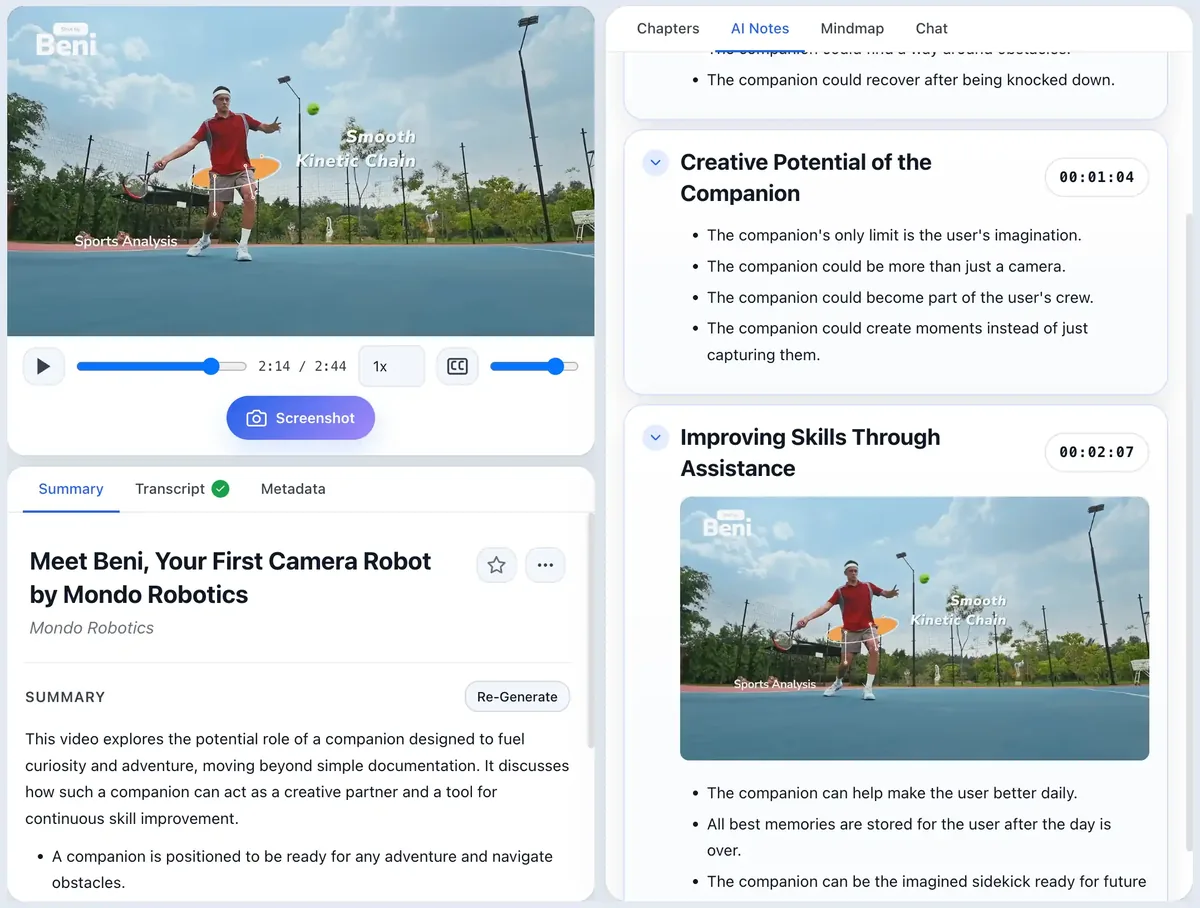
ScribeShot pairs transcript-based structure with the frames you deliberately capture. When you click screenshot while watching, ScribeShot records the video position, saves the image locally, analyzes it for useful visual context, and files it under the note section covering that timestamp.
Key capabilities of screenshot-aware video notes
- Inline Timestamp Alignment: Screenshots land under the note section covering the relevant video time range.
- AI Vision Analysis: Text, code, and diagrams inside captured frames can become searchable context alongside the transcript.
- Screenshot-Aware Video Chat: When a captured frame is relevant to a question, chat can use it as context and show that frame as evidence.
- Obsidian & Markdown Compatibility: Notes and images save to a local folder on your Mac and remain ordinary files.
- Local AI Option: After the YouTube source and transcript are available, supported Gemma 4 models can run the AI processing locally on your Mac.
How it works
- Add a YouTube link: ScribeShot fetches the available transcript and builds the video workspace.
- Capture key visual moments: Take a screenshot when a slide, diagram, equation, code snippet, or UI state carries information worth preserving.
- Review the combined note: The written explanation, timestamp, and captured frame stay together so you can understand the note or return to the source.
Typical transcript-only web notes vs screenshot-aware notes
| Capability | Typical transcript-only web summarizer | ScribeShot screenshot-aware notes |
|---|---|---|
| Preserves slides & diagrams from the video | Usually not unless images are supplied separately | Yes, when you capture the frame |
| Uses on-screen code or text as context | Usually limited to the transcript | Yes, captured frames can be analyzed |
| Can show captured-frame evidence in chat | Depends on the product | Yes, when a relevant frame is retrieved |
| Canonical note storage | Often a hosted workspace | Local Markdown and image files |
| Local AI processing option | Varies | Yes, with supported Gemma 4 models after source retrieval |
Common questions
How do screenshots get placed under the right timestamp?
When you click screenshot while watching, ScribeShot records the player position and inserts the image under the section heading covering that timestamp range.
Can I search text inside screenshots?
Yes. ScribeShot analyzes text, diagrams, and code inside captured frames using vision AI, so you can search screenshot content in chat.
Are screenshots saved as local image files?
Yes. Screenshots save directly to your local ScribeShot notes folder beside the Markdown file.
Capture your first video with screenshots
Three videos free with three screenshots each, no signup. Snap slides while watching and see them embedded in your notes.
Try 3 videos free • 3 screenshots per video • No credit card • Zero AI cost with local LLM