 ScribeShot
Chat with YouTube Videos & Screenshots on Mac
Ask questions and search a YouTube video using both spoken transcript text and the visual text, code, and diagrams inside screenshots you captured. ScribeShot grounds answers in that available context, links back to the source timestamp, and can show a relevant captured frame when the answer uses visual evidence.
Product docs: See how grounded video chat works →
How an answer is grounded
Question → retrieve source context → answer → verify
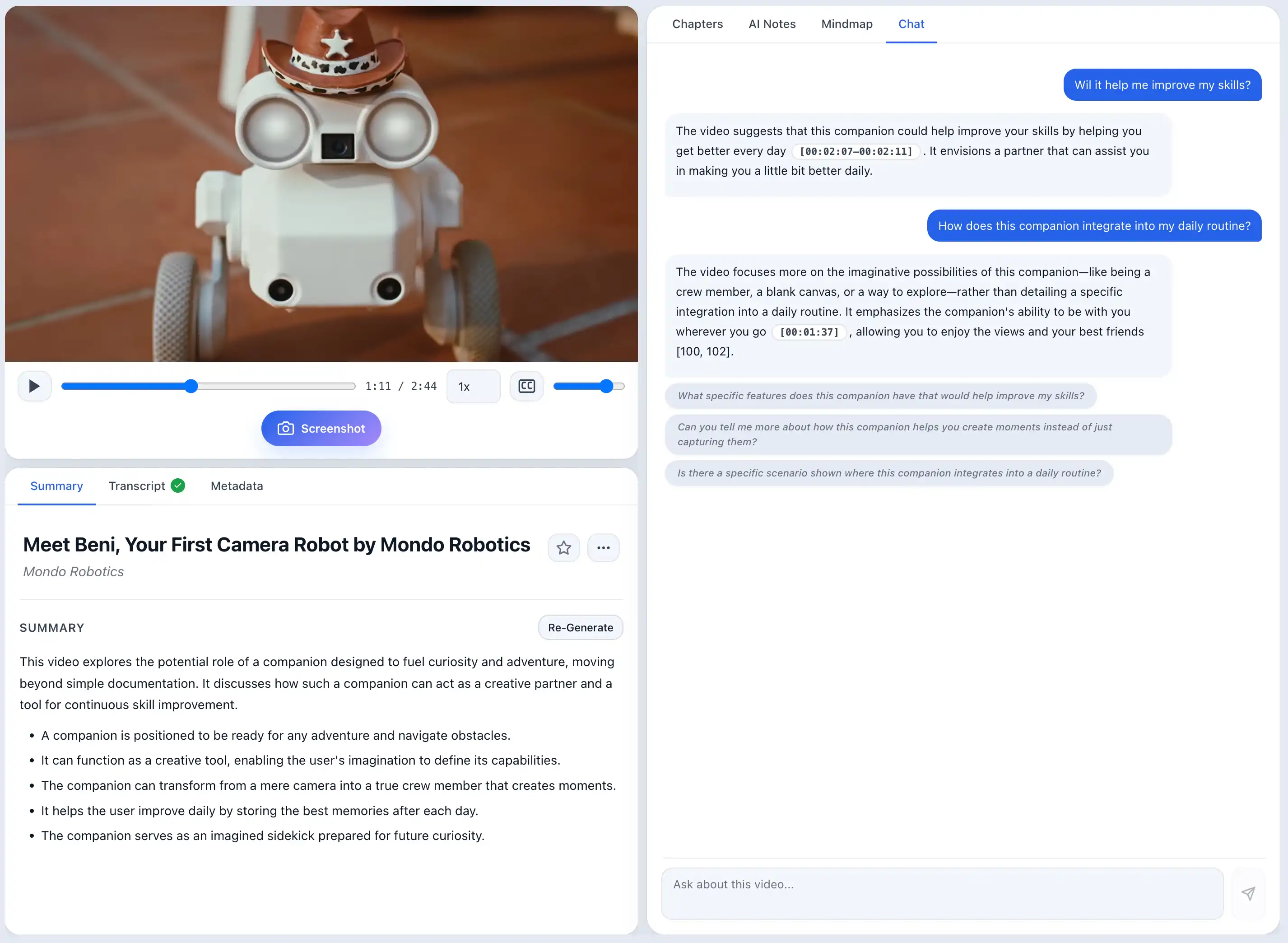
Why transcript-only video chat can miss the screen
Many tools that chat with YouTube start from the text transcript. When a speaker points to a slide and says “as shown in this architecture diagram...” without reciting every detail aloud, the transcript does not contain the full visual information.
ScribeShot combines transcript retrieval with the captured frames you choose to keep. It analyzes those screenshots and indexes their visual content alongside the transcript. When a question matches captured visual context, chat can use that frame as evidence and surface it with the source timestamp.
Capabilities of ScribeShot Video Chat
- Transcript & Visual Search: Searches spoken narration plus text, math formulas, code, and diagrams found in captured frames.
- Relevant Screenshot Evidence: When a captured frame contributes to the answer, the response can include that screenshot for verification.
- Click-to-Jump Navigation: Use the answer timestamp to return the embedded YouTube player to the relevant source moment.
- Local AI Mode: After the YouTube source is available, run chat with a supported local model on your Mac. Cloud-provider API keys are not supported.
- Pro licence required: Video Chat is a licensed feature. The free evaluation includes three videos and three screenshots per trial video, without free video-chat messages.
Need answers across more than one saved video?
Video Chat is the focused workflow for one open lesson, especially when you want that lesson’s timestamps and captured screenshot context. Your saved videos also form a broader knowledge base: use Knowledge Search to find relevant videos and chapters across the library, Ask Knowledge Base to ask questions across saved video notes, and Test Me when you want active-recall practice from what you have learned.
Transcript chat vs screenshot-aware chat
| Capability | Typical transcript-only chat | ScribeShot screenshot-aware chat |
|---|---|---|
| Searches spoken words | Yes | Yes |
| Uses captured text & diagrams from the screen | Usually not from the video frames | Yes, when you captured and analyzed the frame |
| Can show frame evidence beside an answer | Depends on the tool | Yes, when a relevant captured frame is retrieved |
| Returns to the source timestamp | Varies | Yes |
| Local AI processing option | Varies | Yes, with local Gemma 4 after the source is fetched |
Common questions
Does chat read text inside screenshots?
Yes. ScribeShot indexes text, formulas, and diagrams inside captured frames using vision AI.
Can I click a chat answer to jump to the video moment?
Yes. Every answer links back to the timestamp in the embedded player.
Does chat run offline?
Yes for the AI step in local mode. ScribeShot still needs access to the YouTube source and transcript; after that material is available, the built-in Gemma 4 model can run the chat processing on your Mac.
Ask a question about any YouTube video
Three videos free, no signup. Experience transcript and screenshot Q&A.
Try 3 videos free • 3 screenshots per video • No credit card • Zero AI cost with local LLM