 ScribeShot
Why YouTube Transcripts Miss What Matters: Transcript vs Visual Notes
Speech transcripts record what a presenter says, but in coding tutorials, university lectures, and technical talks, the most critical information is presented visually on screen. Learn why transcript-only AI summarizers produce incomplete notes and how visual video notes preserve true technical accuracy.
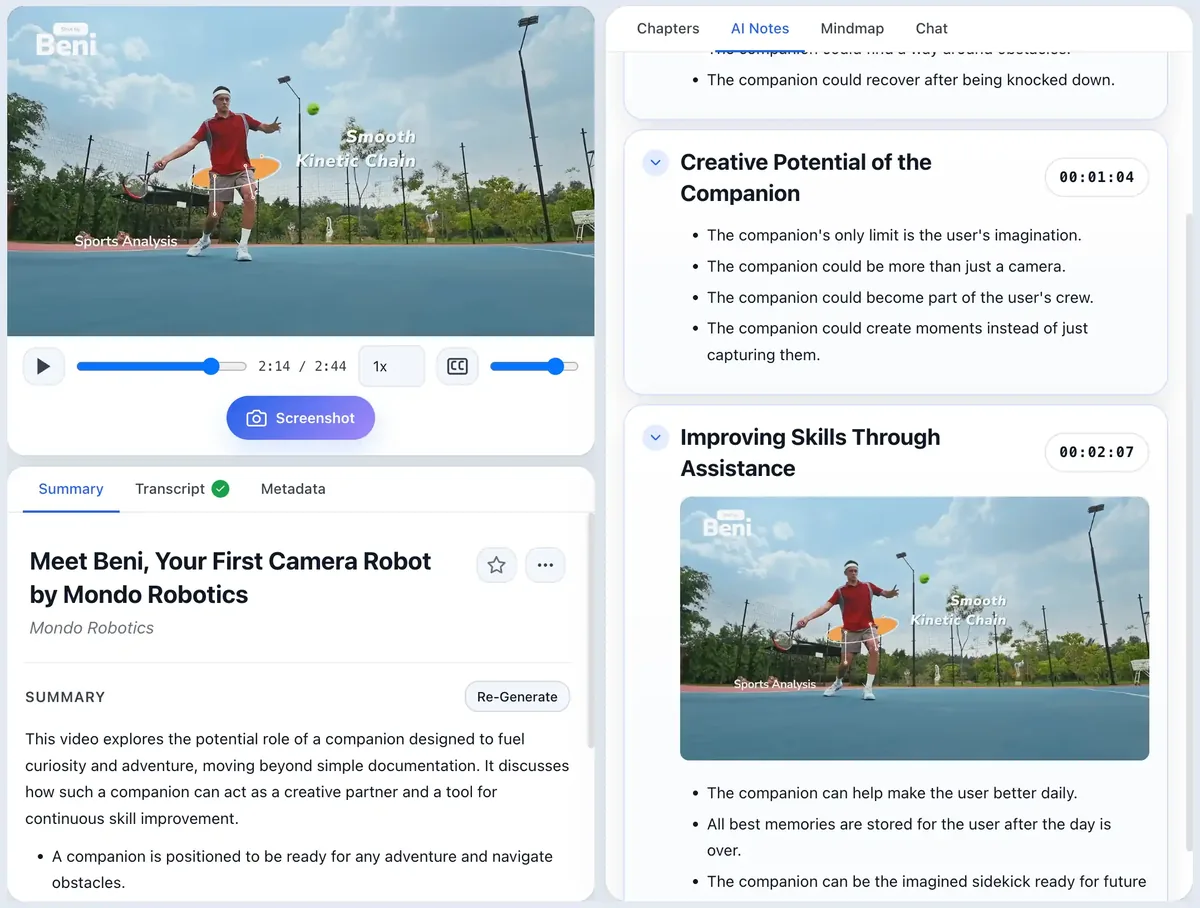
The Transcript Blindspot
Most AI YouTube summarizers rely exclusively on YouTube's automated text transcript. While transcripts work well for podcasts, interviews, or commentary videos, they fail when applied to technical, educational content:
- Coding Tutorials: Instructors often write or modify code on screen while speaking conversationally: “Next, we modify this import line...” The transcript records the spoken sentence, but misses the actual code block syntax.
- University Lectures: Mathematics, physics, and chemistry professors derive complex equations on whiteboards while speaking aloud. A text transcript records partial spoken explanations, leaving equations uncaptured.
- Architecture & System Design: Presenters explain microservices or data flow by drawing diagrams. Transcripts record “As shown in this flow chart...” without capturing the diagram architecture.
The Solution: Synchronized Visual Video Notes
ScribeShot solves the transcript blindspot by combining automated speech transcription with real-time frame capture and vision AI analysis:
- Inline Frame Capture: Clicking Screenshot while watching snaps the video frame and automatically files it under the corresponding timestamp header in your notes.
- Multimodal Vision AI: ScribeShot's vision AI indexes text, formulas, and diagrams inside captured frames alongside the transcript.
- Screenshot-Aware Q&A: When you chat with the video, ScribeShot searches spoken narration and visual slide text, returning answers supported by inline frame previews.
- Local Markdown Ownership: Notes and images save directly to local folders on your Mac, fully readable in Obsidian, VS Code, or Typora.
Transcript-Only Summarizers vs Visual Video Notes
| Information Type | Transcript-Only Summarizers | ScribeShot Visual Notes |
|---|---|---|
| Spoken Narration | Captured | Captured |
| Presentation Slides | Lost | Captured & Embedded Inline |
| Whiteboard Math & Equations | Lost | Captured & Embedded Inline |
| On-Screen Code Syntax | Lost / Incomplete | Captured & Vision Indexed |
| System Architecture Diagrams | Lost | Captured & Embedded Inline |
| Visual Proof in Chat | No | Yes, Screenshot Previews Shown |
Common questions
Why do transcripts fail for coding tutorials?
Transcripts record spoken phrases but miss actual code syntax written or modified on screen.
How does ScribeShot capture visual context?
ScribeShot snaps video frames while watching, runs vision AI over them, and embeds screenshots inline under section timestamps.
Can chat answer questions using text inside screenshots?
Yes. ScribeShot vision AI indexes screenshot text and diagrams alongside transcript text.
Try visual video notes on your next tutorial
Three videos free with three screenshots each, no signup.
Try 3 videos free • 3 screenshots per video • No credit card • Zero AI cost with local LLM